Coming from another DAM? We’ll migrate you for FREE from Canto, Brandfolder, Air, and more! Let’s talk

Image Editor

Edit images without leaving your workspace

Crop, resize, remove backgrounds—and now generate, extend, and enhance images with Stockpress’ AI-powered image editing. Make quick edits or creative transformations without switching tools or waiting for designers.
Get started for free

Make simple crops and resizes, or use AI to generate new images, extend backgrounds, remove unwanted objects, and adjust colors.

See the editor in action

Watch how teams edit—and transform—images in seconds

Essential editing tools

Everything you need for quick image fixes and adjustments

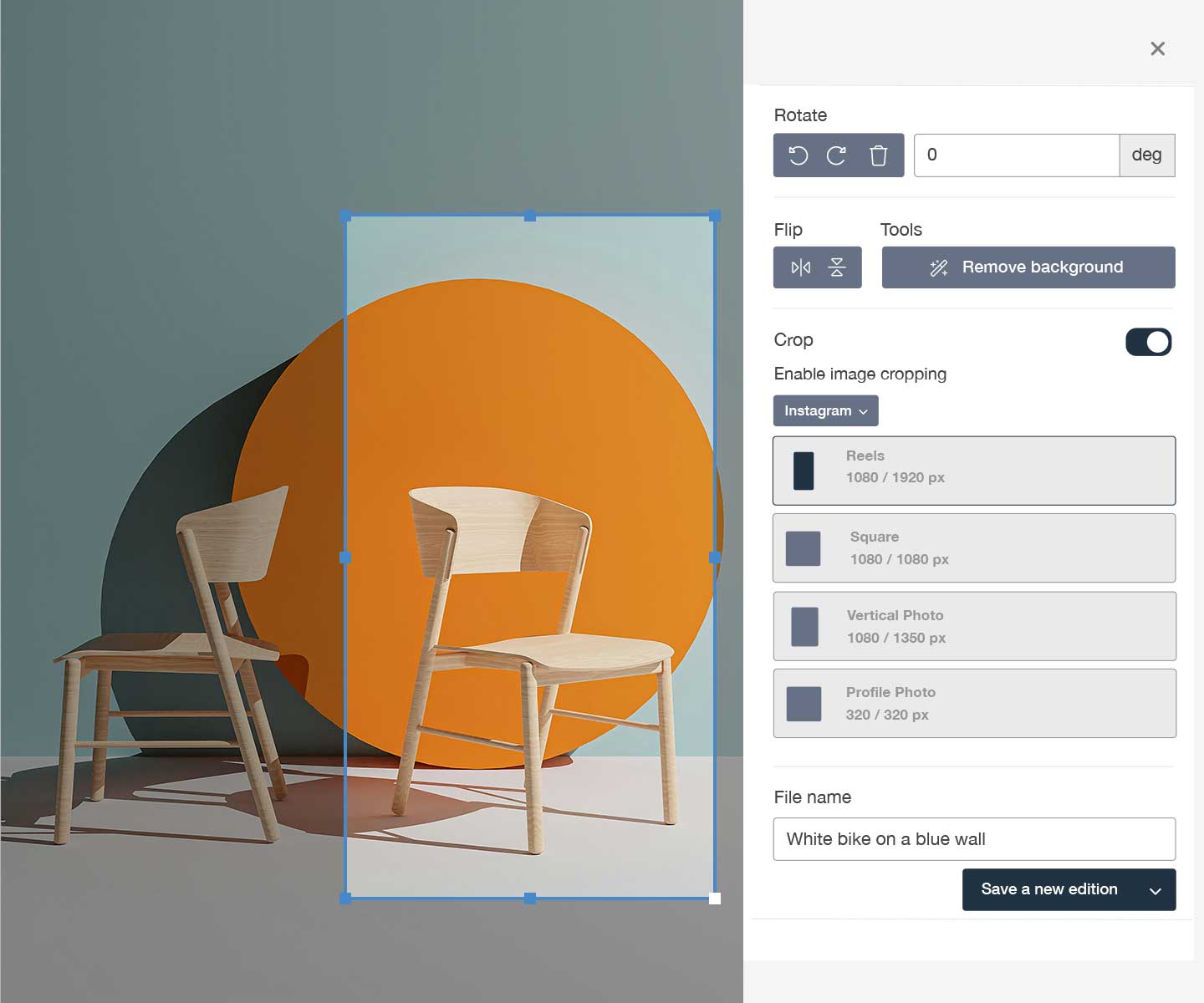
Smart crop and resize

Wrong size or aspect ratio?

Smart crop and resize

Choose from preset social media dimensions (Instagram, Facebook, LinkedIn) or enter custom sizes. Crop with precision guides or freehand selection. Perfect for quick social media prep!

One-click background and foreground removal

Need to get rid of that background?

One-click background and foreground removal

Remove backgrounds or foregrounds instantly with AI. Perfect for product shots, headshots, and any image that needs isolation. No manual masking or Photoshop required.

Background replacement with AI

Want to replace your background?

Background replacement with AI

Replace a background using a text prompt or an image reference. Swap a product into a new scene, reframe a headshot, or generate an entirely new setting in seconds.

File Editions and Versions

Need multiple sizes of one image?

File Editions and Versions

Save edits as editions (variations accessible to everyone) or new versions (replacing the original in search). Keep all variations connected, including the original!

Who benefits from Image Editing

See how different teams use built-in editing

E-commerce teams

Remove product backgrounds for clean listings. Resize for different marketplaces. Extend product shots to fill banner spaces. Edit at scale.

Find out more

Email marketers

Crop header images, remove backgrounds from products, adjust image sizes for email templates. Make quick edits without slowing campaign launches.

Find out more

Marketing & Communications

Crop images to fit slides, remove distracting backgrounds, adjust colors to match brand guidelines. Edit without leaving your workflow.

Find out more

Start editing images smarter today

The Image Editor is just one of the handy reasons to try Stockpress. Try Stockpress free for 14 days with full access to editing and AI tools. No credit card required.

No credit card required. Try all Premium features for 14 days.

Image Editor FAQs

  • Does the image editor change my original file?

    No! Your original file is always safe. When you edit an image, you choose how to save: as a new version (which replaces the original in search but keeps the old version accessible), as an edition (a variation connected to the original), or as a one-time download. The original file remains untouched and accessible to admins and file owners.

  • What is a file Edition?

    Editions are variations of a file that everyone in your workspace can access, download, or share. They’re connected to the original file but don’t appear in search results by default. Perfect for creating multiple sizes of the same image (like social media crops) without cluttering your library. You can separate editions into standalone files anytime.

  • Who can add a crop as a file version?

    Only admins and file owners (the user who uploaded the file!) can save files as new versions that replace the original file in search. If you want other users to be able to version files with the image editor, you can create a custom role!

  • Who can edit images and save versions?

    Anyone with access to a file can open the editor and make edits. However, only admins and file owners (the person who uploaded it) can save edited images as new versions that replace the original in search. All users can create editions or download edited images. You can customize these permissions with custom roles.

  • Can I edit images on mobile devices?

    Yes! The image editor works on both the Stockpress mobile app and mobile web browser. All editing features are available on mobile, including AI-powered tools. The interface is optimized for touch with intuitive gestures for cropping, rotating, and selecting areas.

  • What image formats can I edit?

    The editor supports all common image formats: JPG, PNG, HEIC, and more. You can export edited images as JPG or PNG. AI features work with all supported image formats. For best results with AI tools, use high-resolution source images.